





I work from my wheelchair, so a lot of the usual desk advice doesn’t quite fit. But the fixes that worked for me aren’t wheelchair-specific at all.
Here are four changes to my desk setup and three neck exercises for desk work, done every day. My physio gave me all three exercises and helped me set up my desk, and they’ll work for you whether you sit in a wheelchair or an office chair. They’re not just for desk work either; they’re good for anyone who wants a stronger neck.
This is part of our series on shoulder health for wheelchair users: strengthen, protect and recover
The quick version.
Set up your desk:
- Raise your laptop on a stand so the top of the screen sits at eye level.
- Use a separate keyboard so your arms can rest low and relaxed.
- Use a trackpad (or mouse) beside the keyboard, close to your body.
- Use a neck massager to ease tension at the end of the day.
Then do these 3 stretches: chin tucks, shoulder pockets and shoulder roll-backs.
Why desk setup matters even more in a wheelchair.
Most desks are built for office chairs. Office chairs go up and down; my wheelchair doesn’t. My seat height is set for pushing, not for typing, so the desk has to work around me.
That causes a few problems. If the desk is too high, my shoulders creep up towards my ears to reach the keyboard. If my armrests or knees stop me rolling in close, I end up leaning forward. And a laptop flat on the desk pulls my eyes, and my whole head, down.
Your head weighs about as much as a bowling ball. Every few centimetres, it drifts forward, and your neck and upper shoulders work harder to hold it up. Do that for eight hours, and the stiffness makes sense.
The good news? You don’t need a full renovation to make a big difference.
My desk setup for neck health.
Laptop stand.
This was the single biggest change. With the laptop raised, the top of the screen sits at eye level, and I’m looking straight ahead instead of down. My head stays stacked over my shoulders.
Separate keyboard.
Once the laptop is up on a stand, you can’t type on it comfortably. A separate keyboard fixes that. It sits low on the desk so my elbows stay close to my sides and my shoulders can drop and relax.
Trackpad.
I use a separate trackpad next to the keyboard. Keep it close to your body so you’re not reaching out to the side all day. That constant reach is a quiet source of shoulder tension.
Neck massager.
I use a kneading neck and shoulder massager as my end-of-day reset. It eases the tightness that builds up in my neck and the tops of my shoulders, especially after a long stretch at the screen.
It sits across the back of my neck and shoulders, and the arm loops let me pull it in for more pressure or ease off when I want less. Rotating massage heads work through the tight spots.
After a long stretch at the screen, I sit back and let it work through the knots across the tops of my shoulders. It won’t fix a bad desk setup, but it’s my favourite way to switch off once the laptop’s closed.
|
Setup change |
What it fixes |
Quick check |
|
Laptop stand |
Looking down at the screen |
Top of screen at eye level |
|
Separate keyboard |
Shoulders hunched to reach |
Elbows close to your sides, shoulders relaxed |
|
Trackpad or mouse |
Reaching out to the side |
Within easy reach, next to the keyboard |
|
Neck massager |
End-of-day tension |
A few minutes after work |
3 neck strengthening exercises.
My physio gave me these three. All are done sitting, right at your desk. No doorway, no floor, no standing. You’ll just need a resistance band for the third one.
1. Chin tucks.
Sit tall and look straight ahead. Gently draw your chin straight back, as if you’re making a double chin. Keep your eyes level; don’t tip your head down. Hold, then relax.
Common mistake. Nodding down instead of sliding back. Think “drawer closing,” not “head bowing.”
2. Neck roll-backs.
Start with a chin tuck. Then, keeping your neck strong and sturdy, slowly roll your head back to look up towards the ceiling. Bring it back down to the start under control.
Common mistake. Letting your head flop back. Stay strong through the whole movement, and only go as far as feels comfortable. If you feel dizzy, stop.
3. Shoulder pockets with a resistance band.
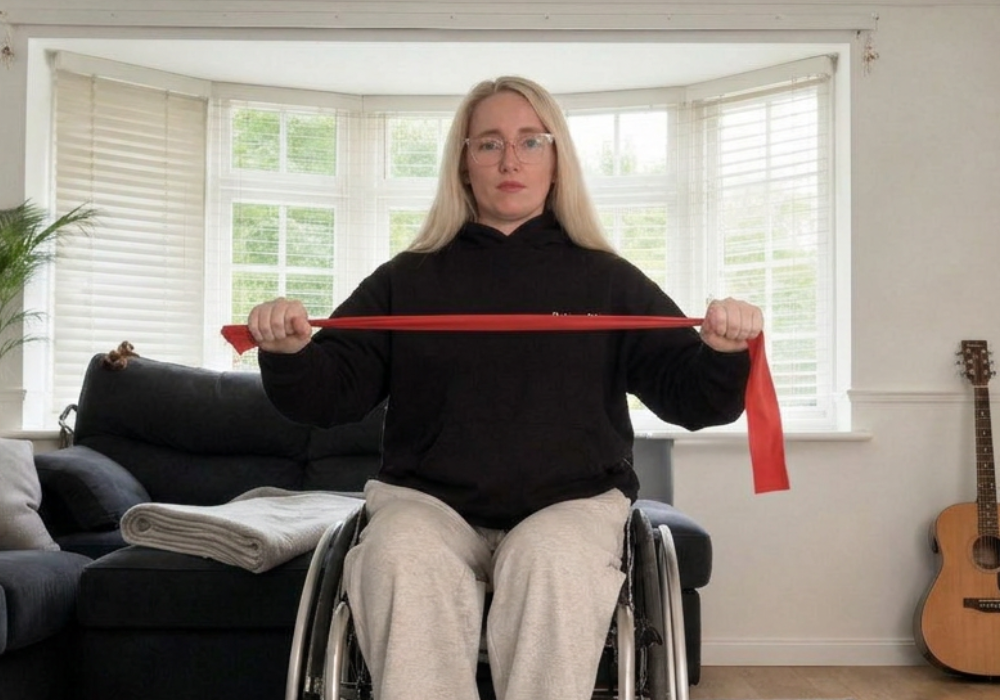
Hold a resistance band out in front of you with both hands. Lift your shoulders up and back, then tuck them down as if you’re sliding your shoulder blades into your back pockets. Holding that position, pull the band apart out to the sides, then bring it back in slowly.
This one strengthens the back of the neck and the upper back, the muscles that hold your head up all day.
Common mistake. Shrugging up while you pull. Once your shoulders are tucked into your back pockets, keep them there.
How often to do them.
I do all three a few times a day, usually when I notice I’ve been at the screen too long. It takes about two minutes. If you need a reminder, set one every hour or tie it to something you already do, like refilling your water.
Keep going.
Neck and shoulders work as a team. If these help, the rest of the series builds on them:
- Shoulder health for wheelchair users: strengthen, protect and recover
- Dead hangs for shoulder health: my DIY hanging bars
- Shoulder recovery for wheelchair users: my weekly routine
- Shoulder exercises for wheelchair users: a 4-move strength routine
- Wheelchair pushing technique and chair setup for healthy shoulders
FAQ.
What are the best neck exercises for desk work?
Chin tucks, shoulder blade squeezes (shoulder pockets) and shoulder roll-backs. All three can be done sitting at your desk, take about two minutes, and counter the forward-head, rounded-shoulder posture that long screen time creates.
How high should my laptop screen be?
The top of the screen should sit at about eye level, so you look straight ahead rather than down. A laptop stand with a separate keyboard and trackpad or mouse is the easiest way to get there.
Do these exercises work for wheelchair users?
Yes. All three are done seated and need no equipment. Wheelchair users often benefit even more, because a fixed seat height can make desks harder to set up well.
Are these exercises only for desk workers?
No. They’re good for anyone who wants to strengthen their neck or deals with neck stiffness. If you already have neck pain, get a physio to check which exercises suit you, as Gem did.
How often should I do neck exercises at work?
A few times a day is a good target, especially after long stretches at the screen. Short and often beats one long session.
When should I see someone about neck pain?
See a physio or doctor if neck pain lasts more than a couple of weeks, or comes with headaches, pins and needles, numbness or weakness in your arms.

Leave a comment
All comments are moderated before being published.
This site is protected by hCaptcha and the hCaptcha Privacy Policy and Terms of Service apply.